Overview
NautilusDB makes it easy to provide long-term memory for high-performance AI applications. It’s a fully-managed, cloud-native vector search service. NautilusDB serves fresh, filtered search results with low latency at the scale of billions of vectors.
Auto & Unlimited Scale
NautilusDB is built from the ground up for the cloud that separates compute from storage. You won't have to make predictions about your data's size and workload when provisioning compute resources ahead of time, nor be concerned about actively monitoring and manually adjusting compute resources in response to unexpected workload spikes. With NautilusDB, scaling occurs automatically in response to changes in data size and workload. This means you can effortlessly create collections, ingest data, and immediately begin searching without these complex considerations.
Pay Per Use
You will only pay for what you uses. There is no charge when there is no request.
Strong Consistency and MVCC
NautilusDB ensures both Strong Consistency and MVCC (Multiversion Concurrency Control). Once a data change is committed, it becomes instantly visible to queries. The search results reflect the consistent state of the data, including all committed changes up to the search's timestamp, eliminating concerns about concurrent data alterations.
Support vector data and metadata
Each record in a NautilusDB collection contains a unique ID and an array of floats representing a vector embedding. Each record may also contains the metadata key-value pairs, and support the standard SQL filter for the metadata. Please check Collections for more details.
Understanding Collections
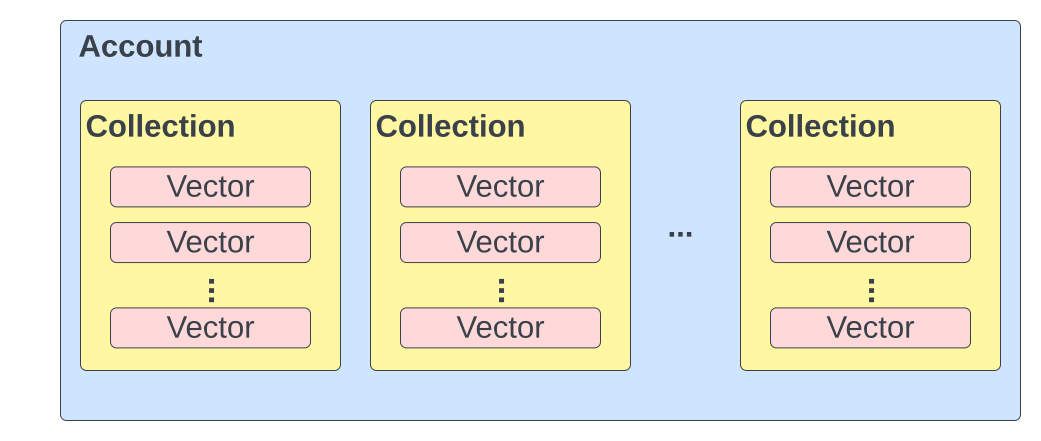
A Collection in NautilusDB is the organizational unit for vector data. It is responsible for the acceptance, storage, and management of vectors. It also facilitates vector queries and performs various other operations on its contained vectors.
A Vector is a record with a unique ID, an array of floats representing a vector embedding and an optional set of metadata columns. All vectors within a Collection must have the same embedding dimension.
Metadata Column Data Type
NautilusDB supports avro primitive types for Metadata Column Data Type. You can find the definition of each data type in Avro primitive types.
    Boolean = "boolean"
    Int = "int"
    Long = "long"
    Float = "float"
    Double = "double"
    String = "string"
    Bytes = "bytes"
Metadata Filtering
NautilusDB supports the standard SQL filter (WHERE clause) for the metadata, and supports a wide range of operators, including:
Comparison Operators: =, <, >, <=, >=, !=
Boolean Operators: and, or, not
Grouping Operators: ()
Null Check: is null, is not null
Metadata Column Change
At present, it is required to specify all metadata columns when creating a collection, and it is not possible to add or remove metadata columns after the collection has been created. However, we have plans to introduce support for adding and dropping metadata columns in a future release.
Manage Collections
NautilusDB is a Cloud-Native vector search service that offers straightforward collection management. With NautilusDB, you can easily perform actions such as creating, describing, listing, and deleting collections. The service automatically scales storage and compute independently, eliminating any management overhead for you. Additionally, since vectors in collections are persistently stored in cloud storage, there is no need for you to worry about backing them up.
Quickstart - Website Question Answering
This guide explains how to set up a NautilusDB question answering service for your website in minutes.
1. Install NautilusDB python client
Use the following shell command to install NautilusDB client:
pip install nautilusdb-client
2. Get an API Key
You can create an API key and use it to create and access the collection. No one can access this collection without the API key. Please safely keep the API Key as you need to use it to access the collection later.
import nautilusdb as ndb

# Create an API key
my_api_key = ndb.create_api_key()
3. Create a collection
The command below creates a collection named "my_website".
import nautilusdb as ndb

ndb.init(api_key="my_api_key")

# Create a collection
collection = ndb.collection('my_website')
ndb.create_collection(collection)
4. Crawl your website
You can pass the website root url. NautilusDB will automatically crawl it.
import nautilusdb as ndb

ndb.init(api_key="")

# Create the crawl task
collection = ndb.collection('my_website')
crawl_id = collection.create_crawl('https://www.example.com')

# Query the crawl status
resp = collection.get_crawl(crawl_id)

# check resp.crawl_status becomes CrawlStatus.SUCCEEDED, and index the pages
collection.index_crawl(crawl_id)
5. Ask questions
Ask question to get answer from the content in your website.
openai-web is an available public collection that contains contents of www.openai.com. Anyone can access this collection, although a valid API Key is still required.
import nautilusdb as ndb

ndb.init(api_key="my_api_key")

# Get a plain text answer, as well as a list of references from the collection
# that are the most relevant to the question.
answer, refs = ndb.collection('my_website').ask('question?')

answer, refs = ndb.collection('openai-web').ask('what is red team?')
print(answer)

# ref shows the contents that are used to get the answer.
[print(ref.doc_name) for ref in refs]
Quickstart - Question Answering across Documents
This guide explains how to set up a NautilusDB question answering service in minutes.
1. Install NautilusDB python client
Use the following shell command to install NautilusDB client:
pip install nautilusdb-client
2. Get an API Key
You can create an API key and use it to create and access the collection. No one can access this collection without the API key. Please safely keep the API Key as you need to use it to access the collection later.
import nautilusdb as ndb

# Create an API key
my_api_key = ndb.create_api_key()
3. Create a collection
The command below creates a collection named "llm_research".
import nautilusdb as ndb

ndb.init(api_key="my_api_key")

# Create a collection
collection = ndb.collection('llm_research')
ndb.create_collection(collection)
4. Upload documents
You can upload a local file or a file from a web URL and index it into a collection.
import nautilusdb as ndb

ndb.init(api_key="my_api_key")

collection = ndb.collection('llm_research')

# Local file and URLs are both supported.
# URL must contain the full scheme prefix (http:// or https://)
collection.upload_document('/path/to/file.pdf')
collection.upload_document('https://path/to/file.pdf')
5. Summarize
After a document is uploaded, you can get a summary of the document. summarize_document() method returns a plain-text summary of the document
import nautilusdb as ndb

# Optional API key to access private collections
ndb.init(api_key="my_api_key")

summary = ndb.collection('llm_research').summarize_document('file.pdf')
6. Ask questions
After documents are uploaded, you can ask questions within a collection. ask() method returns a plain-text answer to your question, as well as a list of most relevance references used to derive the answer.
import nautilusdb as ndb

# Optional API key to access private collections
ndb.init(api_key="my_api_key")

answer, refs = ndb.collection('llm_research').ask('what is a transformer?')

print(answer)

# ref shows the contents that are used to get the answer.
[print(ref) for ref in refs]
7. Chat
You may want to ask a follow-up question on top of the previous questions and answers. You can do so with chat() API. Ask in a chat will answer the question based on the contents related to the question and the previous questions and answers.
import nautilusdb as ndb

# Optional API key to access private collections
ndb.init(api_key="my_api_key")

# start a new chat
chat = ndb.collection('llm_research').chat()

# ask the first question
answer, refs = chat.ask('what is a transformer?')

# ask the second question
answer, refs = chat.ask('how does transformer work?')

print(answer)

# ref shows the contents that are used to get the answer.
[print(ref) for ref in refs]
API Key
You can create an API key and use it to create a collection. This API key will serve as the authentication mechanism for all subsequent API calls made to the collection. If you are using the Python client, you can initialize a client object, which allows you to provide your API key in one place and use it multiple times.
The following code shows how to create an API key and how to initialize the client using the API key.
import nautilusdb as ndb

# Create an API key
my_api_key = ndb.create_api_key()

# Init API key to access private collections
ndb.init(api_key="my_api_key")

answer, refs = ndb.collection('llm_research').ask('what is a transformer?')
Users & Roles
Will be supported soon.
Release notes
December 29, 2023
Auto Website Crawl: support create/get/index crawl APIs, that automatically crawls a website and generates the index.
Support CSV files and Simplify APIs for documents Q&A.
Change Project to Namespace.
December 4, 2023
Introduce the Project Concept.
Enhance document Q&A:
- Chat that is aware of the history questions and answers.
- Support Ask or Chat with all documents or a single Document in the collection.
- Summarize Document.
- List Documents in the collection.
- Delete a Document in the collection.
November 14, 2023
Support Metadata Query API, Describe Collection API and Delete Vectors API.
November 6, 2023
The public alpha release allows you to create an API key and use the API key to create collection and vectors, without signing up. The release supports:
- Foundamental Vector Search.
- Built-in Document Search and Q&A.
Limits:
- Shared environment
- Max 20K vectors (~2K vectors for openai website)
- Max Single File Size 10MB
- Collection is deleted automatically after 2 weeks